
Any and all advice, guides, and reviews are unbiased and based on my personal experience. If you buy through affiliate links, I may earn commissions, which helps support my website. This does not have an impact on posts or my opinion of any reviewed products. If you find this post helpful and want to say thanks, please buy me a coffee or take a look at my book on Amazon. It keeps this page ad-free. Thank you!
I had this weird Apple HomeKit issue where every time I started HomeKit it went through the entire setup process again, then HomeKit gave an error message “Could not complete operation” on the Intercom feature. What was really frustrating is I had a fully working HomeKit – all of my smart devices were visible, they responded, etc. but I was forced into the HomeKit setup before I could access devices. Read on for the solution!
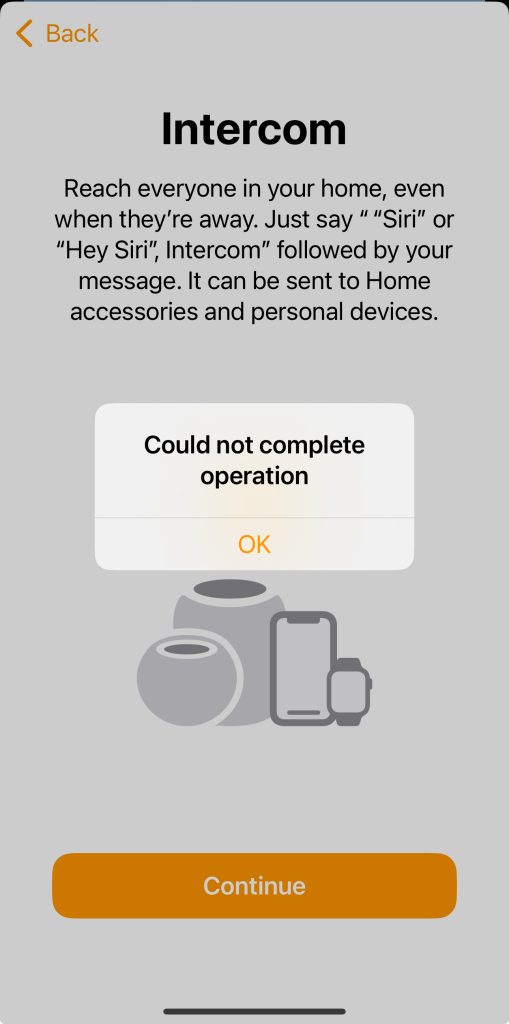
I was so frustrated by the error, out of desperation, I called Apple who suggested I try deleting all devices and setting it all up again. Ugh. There was no way I was prepared to do that and you don’t have too either! There is a solution for the HomeKit Setup / Operation Error that worked for me.
How to Fix Apple HomeKit Always Restarting Setup / Operation Error
Important: You need to be the Resident (Owner) on the account. If you’re not, have the Resident (Owner) do this on their account.
- Start HomeKit and go through the setup walk through and ignore any error messages.
- Tap the Circle with 3 dots in the top right corner, select Home Settings.
- Tap the names of each and every person (other than yourself) who is a member of the household and remove them (Remove Person)
- Restart HomeKit
- The problem should be fixed!
Yes, you can re-add everyone back after you complete these steps.
I was trying to work out how and why this happens, it seems like it’s because one of members of your home in HomeKit has a profile that has gone out of sync. Maybe from a new phone or other Apple device that was recently setup in HomeKit. Removing the individual and re-adding them doesn’t re-create the problem. The only issue is you don’t know which household member has a corrupt profile, which is why you need to remove them all. Either way, this worked for me and is infinitely easier than deleting all devices and re-adding them.
Hope this helps someone else!
Any and all advice, guides, and reviews are unbiased and based on my personal experience. If you buy through affiliate links, I may earn commissions, which helps support my website. This does not have an impact on posts or my opinion of any reviewed products. If you find this post helpful and want to say thanks, please buy me a coffee or take a look at my book on Amazon. It keeps this page ad-free. Thank you!