
Any and all advice, guides, and reviews are unbiased and based on my personal experience. If you buy through affiliate links, I may earn commissions, which helps support my website. This does not have an impact on posts or my opinion of any reviewed products. If you find this post helpful and want to say thanks, please buy me a coffee or take a look at my book on Amazon. It keeps this page ad-free. Thank you!
Like all my reviews, this is 100% my personal opinion and I am not compensated or incentivized. This is my unbiased opinion, which I share in case it helps others save some money and I am not affiliate with Lasso.
I’m not an extreme couponer, you wouldn’t find me on in front of you in the supermarket buying 50 tins of pet food for 98c because of expert coupon stacking. That said, I do clip coupons. Mostly I have done this in store at shelf, firing up the relevant app and checking if there is a deal or coupon before buying something. Typically, this is at CVS, because they don’t advertise coupon-linked offers at the shelf and there always seems to a coupon hidden in the app. Every time I do this, I have always ask myself, “is there a better way to clip coupons”?
For a while, I found it thanks to some random code you could paste into the Chrome Console (this one). Sure, it works and worked, but it’s far from user friendly or set and forget. I also wanted more, mainly because my local supermarket locks all discount prices behind clipping coupons to get the member price. Which is kind of absurd when membership is free… but I digress. As much as I tried, even looked (shudder) to AI for a way to code a solution, I remained on the quest for perfect solution for clipping coupons.
Eureka Moment! Throw Lasso Automatic Coupon Clipper
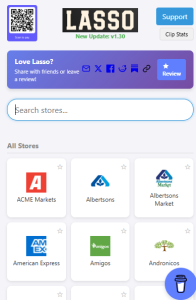 Then, somewhat randomly, I discovered ThrowLasso or simple “Lasso”. How did I find it, I think I was searching for the CVS Coupon Clipper when visiting a friend to show them how it was done and Lasso showed up in the results. I’d never heard of Lasso in the US but here’s some random trivia, Lasso back in Australia was an online catalog site. Intrigued by the US Lasso promise, I decided to give it a go in a sandboxed version of a Chromium browser on Windows. Like all browser plugins, it was easy plugin install and it didn’t ask for registration or passwords or odd permissions, so it was time to put it to the test.
Note: For what it’s worth, the Lasso browser plugin is for Chrome, natively on Edge, and Firefox and automatically clips coupons. All my testing was done on Edge Chromium edition across PC and macOS.
How does Lasso work? The Browser Plugin Version…
I’m not going to get deep into the technical side, but having reviewed the code, it’s a series of scripts tailored to each retailer, bank, etc. that reads the page, finds the ‘clip’, ‘add’, or whatever the store calls it coupon clip buttons and automatically clips them. It also has the smarts to automatically close any overlays or modal windows that might be opened after you clip a coupon. I’m looking at you (stupid bank name deleted) that has 100s of coupons and they all spawn a window you would otherwise manually need to close if not for the Lasso plugin. The plugin is elegantly designed so the developer (Michael Oliver) can easily add, remove, or fix stores if they change their store logic. And it’s frequently updated, despite my discovery in 2026, Lasso has been around since 2023 and it’s been regularly updated, almost daily this year according to the change log.
Does Lasso automatically clip coupons on your phone too?
Yes! There’s also a free Throw Lasso mobile app available for Android and iOS. I only have an iPhone, so have only tested there – but it works pretty much the same way, it uses iOS WebKit to browse to the website and then it runs the magical automatic coupon clipping script for whatever retailer or bank site you’re on. I personally use both the desktop browser plugin and the mobile app, as the mobile app is great for when you get to store and think to yourself “damn, I forgot to clip coupons” and you can fire up Lasso and clip coupons quickly as you walk from your car to the store. But the desktop version is great for running across multiple browser tabs to clip coupons from multiple stores at once and desktop does work faster.
Is Lasso coupon clipper safe and trustworthy?
Simple answer, Yes! Aside from me looking at the code, I also pinged the developer and he was more than happy to jump on a call to chat. He’s a genuinely nice person and this all started as a personal passion project to help his Mom (see, told you he’s a good person) which he released to the world. The browser permissions are minimal and outside of optionally buying Michael a coffee (which I recommend) or writing a positive review of the plugin or app (done!) or telling others about it (hence this blog post!) there’s no subscription, registration, or anything else required. Seriously… thank Michael.
What does Lasso automatic coupon clipping look like? How to automatically clip coupons with Lasso.
After you install Lasso (again, 100% free!) you will get a scissors icon in your toolbar.
To get started, you then need to browse over to your favorite retailer and login to their site and navigate to the relevant coupon page. When you first hit the retailer (or bank) website, Lasso will insert an alert bar at the top of the site, letting you know it’s “Lasso enabled”.

When you get to the actual coupon page, you click the Lasso icon again and it works its magic, automatically clipping coupons. The navigation bar will update, and if the retailer uses an iFrame or some other implementation, you’ll also get an overlay in the actual coupon area as well, see below for one of my local supermarkets.

In terms of “how fast is Lasso at automatically clipping coupons” that depends on a few factors. The easy answer is it can be lightning fast, doing it in seconds. On one bank (you know who you are), it can be slower because the bank has a bad user experience. I tend to leave banks running in a separate browser tab. I have had one retailer pause the process midway for me to verify I am not a bot (I’m human!) but an update to Lasso fixed that and it now goes a little slower so as to not freak out the store.
How often do I automatically clip coupons?
I tend to clip my grocery coupons twice a week, once on my computer each weekend and also via the app in the car park before I go into the store. Banks, less frequently as they tend to overload coupons, so about every few weeks. As much as I have tried to figure out the perfect system, there’s no perfect day to pick. Retailers tend to do a full refresh each week but there are limited time offers so it pays to be vigilant. Banks are random, loading cash back and coupons all the time. It’s probably my only wishlist item for Lasso, that it would track when new offers appear or how many I clipped since last visit – but that would probably require registration and more. As it is, Lasso is perfect for what I need.
Where can you automatically clip coupons with Lasso?
The answer I tend to give is everywhere. Lasso clips coupons all the majors stores like CVS, Walgreens, Walmart, Target to dozens of local independent grocers and even all of the banks like Amex, Citi, Chase. I’ve tried to organize this list in a way that makes sense, but here’s where Lasso works to automatically clip coupons.
Grocery Stores
ACME Markets, Albertsons, Albertsons Market, Amigos United, Andronico’s, Balducci’s, Big Y, Brookshire’s, Cardenas Markets, Carrs QC, Cub, El Rancho, Fairway Market, Food 4 Less, Food City, Food Lion, Food Maxx, Fred Meyer, FreshDirect, Fresh Market Plus, Fresh Thyme, Fry’s Food, Giant Eagle, Giant Food, Giant Food Stores, Gourmet Garage, Grand Union, Haggen, Hannaford, Harris Teeter, Harveys Supermarkets, H‑E‑B, Hy‑Vee, Jewel‑Osco, Kings, King Soopers, Kroger, KTA Super Stores, Lowe’s Food, Lucky Supermarkets, Mariano’s, Market 32, Market Street United, Meijer, Metro Market, Millers Markets, My Price Chopper, Pavilions, Piggly Wiggly, Price Chopper, Price Rite, Publix, Raley’s, Ralphs, Ranch Market Rewards, Randalls, Roche Bros, Safeway, Save Mart, Schnucks, Shaws, Shoppers Food, ShopRite, Smart & Final, Smith’s Food and Drug, Sprouts, Star Market, Stop & Shop, Superior Grocers, The Fresh Grocer, The Fresh Market, The Pig, Tom Thumb, Tony’s Fresh Market, Tops Markets, United Supermarkets, Vons, Walmart, Wegmans, Weis Markets, WinCo, Winn‑Dixie
Drugstores
CVS, Rite Aid, Walgreens
General Retailers
Commissaries, Dollar General, Family Dollar, Overstock, Sephora, Target, Walmart (FWIW, I didn’t even know Walmart had coupons until I used Lasso)
Banks and Financial Services
American Express, Bank of America, Capital One Offers, Chase, Citi, PayPal, U.S. Bank, Wells Fargo
Other
iBotta, Rakuten
I may have missed a store or someone but given this took me a few minutes to do, I won’t keep this list constantly updated… install the Lasso plugin Chrome, natively on Edge, or Firefox find your favorite store and give Lasso a test.
Does Lasso work to automatically clip coupons?
Yes! I have used it on about a dozen retailers without issue. I’ve saved more money as a result too. If a retailer stops working, you can file a support ticket, and it’s usually fixed in a few days to a week.
How much does Lasso Coupon Clipper Cost?
Free! Yes, it is 100% free to automatically clip coupons on your browser or mobile device, no subscription or monthly charge. Seriously, buy Michael a coffee and say thanks!
Tips and Tricks for Getting the Most out of Lasso
Like I’ve said, I have been automatically clipping coupons with Lasso for a few months now and automatically clipping coupons has saved me money. I have discovered that the plugin works best (at least for me) in Incognito/Privacy mode. I use the EFF Privacy Badger plugin and it can interfere with retailer coupon pages, which can cause Lasso to fail. If you use any sort of privacy or cookie blocking plugin, do the same as me and use a private browser window and blame the retailer not Lasso.
You can add stores/banks as favorites and Lasso can open them all at once and clip them. I don’t use it this way (again, EFF plugin conflict) but this helps make it faster.
Final thoughts and a message for retailers and banks…
If you’re a retailer or bank who stumbles across this page, let me share why I think digital coupons are broken. You abuse the system. There should not be 150 digital coupons to clip (or in the case of one bank 300+ coupons and a bad UI). No one has that time and you’re penalizing people for being time poor. Digital coupons don’t incentivize behavior change when there is too many of them. Personally, a physical coupon delivered to my home gets my attention 100x more than a digital coupon ever will (and this was even before Lasso). I will stick a physical coupon to my fridge; I will scan its QR code and add it to my wallet but making me scroll through and clip 100s of digital coupons each week manually is just exhausting. Lasso has given me time back by automatically clipping coupons, saving me money, and I get a surprise and delight in store because when it shows me coupons I have redeemed, I’m happy to have saved money automatically with Lasso. And retailers and banks, bring back targeted physical coupons that appear in my mailbox if you really want my attention.
Hope this helps someone else!
Any and all advice, guides, and reviews are unbiased and based on my personal experience. If you buy through affiliate links, I may earn commissions, which helps support my website. This does not have an impact on posts or my opinion of any reviewed products. If you find this post helpful and want to say thanks, please buy me a coffee or take a look at my book on Amazon. It keeps this page ad-free. Thank you!