
Any and all advice, guides, and reviews are unbiased and based on my personal experience. If you buy through affiliate links, I may earn commissions, which helps support my website. This does not have an impact on posts or my opinion of any reviewed products. If you find this post helpful and want to say thanks, please buy me a coffee or take a look at my book on Amazon. It keeps this page ad-free. Thank you!
My car didn’t have a front dashcam, which didn’t bother me in the past – but after watching dashcam videos as evidence on YouTube I felt a dashcam become less of a ‘nice to have’ and more of a ‘wish I had’. Since I also travel and often park overnight at an airport, after a friend had their car damaged at the airport, a dashcam became a ‘must have’. I really wanted something that would record 24/7 and if I could access it remotely, like my Ring cameras. I found the LAMTTO on Amazon and at around $100, it ticked enough boxes for me to give it a try. I was mostly intrigued by the LAMTTO promise of LTE for remote access and figured others might be to, so here’s my honest personal review of the LAMTTO DC22 dashcam.
LAMTTO 4G LTE Dash Cam DC22 First Impressions
 Let’s be honest, LAMTTO is an unusual name but at a little over $100, I can live with the name – because who wants to pay 3x the price for a name brand like Garmin? The mobile app is called UBox Pro, but LAMTTO has its own site and seems to make a lot of other in-car smart products including wireless car play adapters, mirror dashcams, and Android Auto/CarPlay screens. I haven’t used any of the other LAMTTO products. I’m also not sure if LAMTTO is an abbreviation for something, possibly Lizards Are Masterminds That Tinker Obviously haha! Seriously though, who cares about the name, if it works!
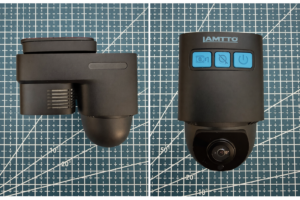
The photos on the right give you a good sense of the side and front view of the device. The dome camera is the one that faces into your car, it can be rotated with a firm grip and twist. The top flat panel tilt adjusts to your windscreen.
First impressions, the LAMTTO DC22 is matte black plastic. It’s lightweight – which is good as you need it to stick to your windscreen. There are two cameras, a front and rear facing camera. The rear facing camera is on a roundish mount and can be twisted to get the optimal in-car viewing angle. Power and pairing LED lights are on the left side (probably my only frustration – wish it was front facing as it’s not obvious to the driver or passengers that recording is working); there are 3 blue front buttons manual record, privacy mode, and power. The privacy button disables the in-car facing camera. The LAMTTO DC 22 is about 4″/10cm long and 2.5″-3″/6-7cm in height depending on whether you measure from the front or rear of the camera.
In the LAMTTO DC22 Dashcam Box you will find:
- LAMTTO 4G LTE Dashcam model DC22 – dual cameras front/rear
- OBD to USB C cable (powers the camera)
- 32GB microSD card (already installed)
- 1x spudger tool (for hiding the cable)
- 4x cable clips (if you need more, I grabbed these ones on Amazon)
- 1x static cling film
- mounting strip
- instruction guide (actually helpful!)
- SIM card removal tool (SIM card built in and not removable – more on that later)
LAMTTO Dashcam Setup
There’s really two parts to setup:
- OBD connection/Car Installation
- LAMTTO Camera Pairing/App Setup
I kind of cheated on first setup, doing Step 2 first before doing 1 – because I didn’t want to get everything wired up without knowing the LAMTTO worked and I was able to pair correctly. But that’s just me… you can power the LAMTTO using a standard USB C cable if you want to do the same as me and have it paired to your phone/app before you do the car install.
LAMTTO OBD Setup/Car Installation
This was the first time I have done a OBD (On Board Diagnostics) connection, and it was 10x easier than I expected. The LAMTTO needs to be OBD connected for always on power. I am guessing you could use a 12V adapter and USB C cable if you didn’t need always on, but the OBD setup means you can hide the cables and have a clean install.
To find your OBD port, pp8 of the instruction guide lists common locations for OBD ports. I ended up consulting YouTube for my specific car – but it’s easy to find. If you want the cleanest setup, I recommend reverse order, which means mount the camera, put in the right-angled USB C cable with the cable facing towards your windscreen, and then run the cable back to your OBD port. This makes it easier to pack excess cable length behind your OBD port and just makes everything cleaner. Use the spudger to hide the cables behind your car panels. I ended up having to use the included cable clips a few times. It took me about 45min to an hour to run the cables, but I am slightly obsessive about getting cables tidy.
Make sure you give yourself enough play (at least an inch or two) in the USB C end of the cable if you need to move the camera later. This is where the included static cling film is important, rather than attaching the mounting plate direct to your windscreen, you can move or reposition the whole unit using the static film. Trust me, after your first drive you will want to adjust the location of the dashcam. Mine is located slightly off center, below and to the right of my mirror. If you damage the static cling, Amazon has generic static dashcam clings for about US$5.
LAMTTO DC22 LTE Dashcam App Setup and Use
There’s both an iOS and Android app, I’m using iOS and the app is called UBox Pro (not to be confused with the Ubox app). The app requires you to create an account, verify your email and you’re ready to pair your DC22 Dashcam. FYI, the confirmation email comes from a UBIA email which might catch you by surprise. To pair, you scan a code on the side of your LAMTTO camera and follow the prompts. Pairing is via Bluetooth. The apps claims you’ll hear a voice prompt “ready to pair” but I didn’t hear that. This is also where the lights in the little panel on the left are not great – you will see a blue flashing light when the DC22 is ready to pair. Holding down the power button is what worked for me. Overall, pairing was mostly straight forward and was completed in a few seconds.
The app lets you view live feeds, scroll recorded clips, download footage and receive push notifications when motion or collisions are detected. The interface is generally user‑friendly and works like most smart home camera apps.
LAMTTO DC22 4G LTE Setup and Costs
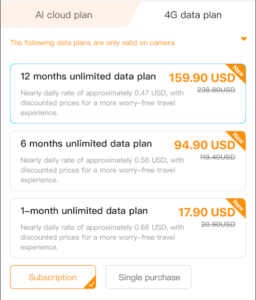 Yes, you need an LTE plan to do the remote viewing, and no, you don’t need to find a SIM card and sign up with a carrier. This is all built into the dashcam and managed via the app. There is an internal, non-removable SIM card and you buy mobile plans using the app.
The annual LAMTTO LTE plan is USD$160. This might seem high, but if I compare against someone like MINT Mobile, this is cheaper than a 12-month MINT plan. So, it’s good value. You can do 12-, 6-, and 1-month subscriptions (see screenshot). It’s not clear who the LTE carrier is (I’ve emailed support to ask, will update if they share).
I haven’t run into any connectivity issues in my tests (US East Coast). The SIM card is built in, so I am not sure why they include a SIM removal tool. I think there may be another LAMTTO model with a removable SIM – which the user guide seems to suggest. But in short, the SIM is included and the data plan you access via the UBox Pro app. You get a trial period, of about 14 days when you first setup. There is now discount for bundling all the features together (wish ther was). If you want to just test it, the 1-month cost is USD$18. Oh, I used the SIM card to help me eject the microSD instead – so it was useful for that!
The GOOD news is the LAMTTO still functions normally as a standard dual-lens dash cam if you don’t use the LTE plan; all video footage is stored locally the microSD card and can be viewed or played back using a card reader.
Cloud Storage Plan and Costs
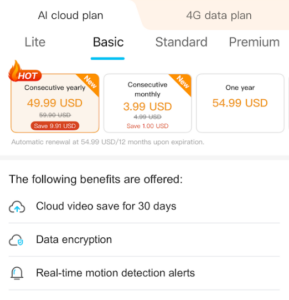 The LAMTTO records locally to the 32GB microSD card in a constant overwrite mode. The included microSD card is a generic I always recommend replacing included microSD with a name brand like Sandisk or Samsung (this will cost you about $20). LAMTTO offer an optional cloud backup from US$40 a year (7-day backup). I opted for the base plan, 7 days of cloud backup and real time motion detection alerts. There are premium plans which offer AI search of videos, these start at US$100 a year for AI features – but I didn’t think I or most people need that, as really all I need is cloud backups and motion detection.
Important to know, and should be obvious, but if you don’t have LTE then you can’t use the cloud backups.
LAMTTO DC22 Annual Operating Costs
So, what does the annual operating cost look like, assuming you are the same as me – 12 months of data (USD$160) and cloud backup (USD$40) you’re looking at USD$200 in operating costs for a Ring-like experience e.g. 24×7 remote monitoring and cloud backups. 80% of that cost is the data plan. You can skip data and cloud backup if you don’t want it and the LAMTTO works fine. But if you’re going down that path, you could probably look at one of LAMTTO’s cheaper non-LTE dashcam products that start at USD$70.
LAMTTO Video/Image Quality
For privacy reasons, I’m not sharing video recordings publicly. Videos are saved to the microSD as MP4s. What I can say is the video is sharp and clear for both front and interior cameras; more than good enough to read plates and identify faces. I tested on a long interstate drive (multiple exits, roadwork, etc.) and the LAMTTO DC-22 handled highway vibration without falling off the windscreen (yay!) or the image blurring (double yay!). I (fortunately) haven’t had to test crash alerts. The videos are watermarked and include the date, time, your actual GPS location along with how fast you are traveling. Great if you need video evidence of what was happening at the time. It seems to set the data and time automatically, either via your phone or GPS/LTE connection – I’m not sure which.
If you have the LTE enabled, you can do live streaming of the video and there is a 2-way voice intercom function. I’m not sure how I would use the latter, maybe as a way to yell at someone if they broke into my car. Although if you were using this in a business setting, this could be helpful to communicate with your driver (not something I really need).
You can share the camera though. And I don’t mean move it from one car to another (which I am sure you can do too) but you can share the app account with others – similar to how Ring works. This means you can let others access the videos, communicate to the car, etc. via the app. They will need to setup their own account.
Overall/Final Verdict
Pros
- Always‑on parking mode via OBD power with 24/7 remote access.
- 4G live view and GPS tracking for remote monitoring and location data.
- 4G data plan is optional, it still works as a dashcam with local microSD storage.
- Dual cameras capture road and the car simultaneously.
- Cloud backup option for secure off‑device storage.
- Easy installation and mostly intuitive app.
- Not locked into 12-month data subscription if you only need remote access for short-term use (USD$18 for a month only).
Cons
- Connects via the OBD port for always on function, if you’re not comfortable connecting to the OBD port that may be an issue.
- Use/Recording Light are side mounted and not easy to read.
- Not clear/known who the mobile network provider is so cell coverage unknown.
If you want more than a basic dash cam, if you want a ring-like dashcam with remote live view, GPS tracking, and a camera that stays powered while parked the LAMTTO 4G LTE dash cam does the job. It’s compact, easy to install, and the LTE capability gives you easy remote access. Yes, the LTE plan comes at an additional cost – but that’s the price you pay for always available peace of mind. Will I renew for 12 months of LTE next year? I’m not sure, I’ll check in on this review in a year and let you know. That said, until Ring make a dashcam, the LAMTTO DC22 dashcam is your best choice.
Save 15% on LAMTTO Dashcam
This may be a limited time thing, but you can save 15% if you buy the LAMTTO DC22 Dashcam with LTE direct using the code vipcar15 (and this seems to work for all products on the LAMTTO website).
If that code has expired, and you want you buy direct from LAMTTO you can get 10% off if you sign up for the onsite coupon. Although check the price on Amazon as well to make sure you’re getting the best deal.
Hope this helps someone else!
Any and all advice, guides, and reviews are unbiased and based on my personal experience. If you buy through affiliate links, I may earn commissions, which helps support my website. This does not have an impact on posts or my opinion of any reviewed products. If you find this post helpful and want to say thanks, please buy me a coffee or take a look at my book on Amazon. It keeps this page ad-free. Thank you!