
Any and all advice, guides, and reviews are unbiased and based on my personal experience. If you buy through affiliate links, I may earn commissions, which helps support my website. This does not have an impact on posts or my opinion of any reviewed products. If you find this post helpful and want to say thanks, please buy me a coffee or take a look at my book on Amazon. It keeps this page ad-free. Thank you!
This is a real user review of the Epomaker TH80 V2 Pro. I own the TH80 V2 Pro in white, with Sea Salt V2 silent switches. It is a 75% layout which provides a good balance between footprint and functionality. What got me to get an Epomaker is not only the white color (coordinates with my white desk), but the dedicated volume knob (great for managing volume across gaming and calls) but the small full color LCD intrigued me (more on that later). It’s also PC/Mac compatible and the appropriate PC keys e.g. Ctrl, Win, Alt have dual labels for Mac e.g. control, option, command, which as someone who uses both – PC for gaming, Mac for work, I appreciate.
Epomaker TH80 V2 First Impressions
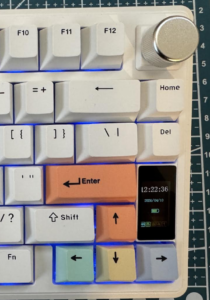 The Epomaker TH80 V2 Pro feels premium. The white is more a slight off-white. The keyboard has good weight and doesn’t feel budget given the price and features. You get a full row of function keys. There are 7 multicolored keys – ESC, Enter, Space, and Arrows (up, down, left, right) which all look good and I believe they make the keyboard feel more premium and professional (see the picture). You get full color RGB backlighting which works great and shows up well even with a white keyboard where contrast is often not your friend. The volume control knob is silver and has re-assuring indents as you adjust the volume. The rear of the keyboard has a USB C port (charging or wired use) and switches for Mac/PC mode, as well as a switch for 2.4Ghz, USB, or Bluetooth mode. There are keyboard feet with two levels of height adjustment, although the TH80 V2 Pro has a wedge design, so if you’re like me, you probably don’t need the feet. There’s also a full color screen, which I will go into later.
In the Epomaker box you will find:
- Epomaker TH80 v2 Pro Keyboard
- long braided USB A to USB C cable
- key removal tool
- USB A 2.4Ghz dongle (hidden/stored underneath the right foot)
- additional key switches (x2)
- additional keycap (Insert)
- Instructions with QR code links
Sea Salt Silent Switches and Acoustics
I chose the Sea Salt Silent switches as I prefer “silent” switches because you can type during a Zoom, Teams, Meets call without the machine-gun staccato in the background. The Sea Salt Silent switches are gasket mounted with a multi‑layer foam stack, so the switches feel softer and quieter than they would in a tray‑mount or top‑mount board. The keys have good linear movement, about 2mm pretravel and 3.6mm total travel. There is none of the scratchiness that usually appears in budget silent linear keyboards. I would definitely class the Sea Salt keys as silent. So, if you’re looking for a mechanical keyboard to use in an open plan office, you would be safe with the Epomaker TH80 V2 Pro.
Epomaker Drivers and Connectivity
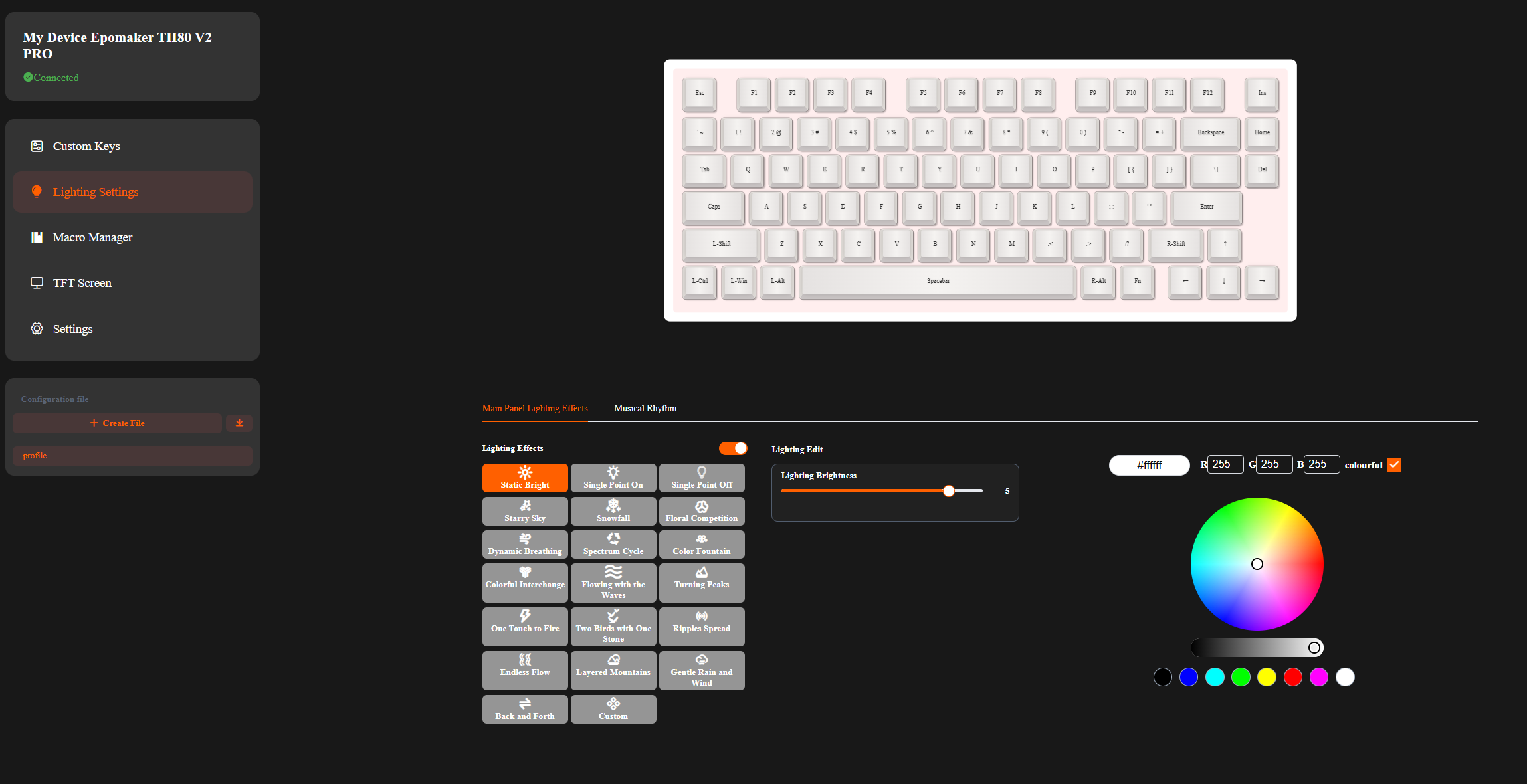 I was a bit thrown at first, the instructions list a range of function key combinations to adjust backlighting, and I couldn’t find drivers on Epomaker. That’s because you don’t need drivers, it’s all done via a webUI, at https://epomaker.driveall.cn/. This is actually a blessing if you’re using the TH80 V2 at work and are restricted on what you can/can’t install. You can click on the screenshot on the right to expand the view of the webUI if you’re interested.
There are some things you can’t do with the webUI which are worth sharing though, you can Bluetooth pair to up to 3 devices, provided the keyboard is in Bluetooth mode.
- Fn + Q Short press to switch to Bluetooth Device 1 / Long press to pair
- Fn + W Short press to switch to Bluetooth Device 2 / Long press
- Fn + E Short press to switch to Bluetooth Device 3 / Long press
FYI: The FN key is on the lower right.
Using Epomakers webUI you can adjust your backlights, customize keys, and more. You can also upload GIFs (when wired) to the LCD screen.
The Epomaker TH80 V2 Pro Screen
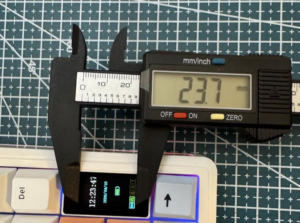
The LCD screen displays time, battery, and connection status. The actual screen size, based on my measurements is 23.7mm based on my digital calipers. The screen ‘looks’ bigger but there is a border, so 23.7mm is the usable area of the screen.
 You can also customize the screen with GIFs on the screen using Epomaker’s web-based tool. I wish Epomaker had a community GIF library and I can’t find the exact specs of the screen, so I snagged the default GIF and measured it.
The specs of the default Epomaker GIF size is 96×160 pixels, but I am not sure if there are limits on frames, size, etc. If you lost or need the default Epomaker TH80 V2 GIF, you can find it on the right.
I’ve reached out to Epomaker to ask on any rules, limitations, etc. on the GIF. Update: Epomaker replied! The maximum frame count for the GIF is 255, there’s no file limit.
If you’ve made a GIF for your Epomaker keyboard and want to share it, contact me, and I’ll start collating a library of GIFs for others who may be interested. Epomaker currently do not offer a library of GIFs for the TH80 V2.
Below are some GIFs I made for the Epomaker TH80V2 screen (96 x 160), I may move these to a separate page at some point.
 |
|  |
|  |
|  |
|  |
| 
If you’re not displaying a GIF, by default the screen shows the time and date (sync’d to your PC), battery level, Windows or Mac mode, type of connection (Wired, 2.4Ghz, BT) and the usual status of caps, etc.
Epomaker Battery Life
Epomaker specs state the TH80 V2 Pro has a 10,000 mAh battery. This is a huge battery. For comparison, I was coming from a Logitech Mechanical Wireless TKL and it only has a 3,000 mAh battery. This means you don’t need to worry about battery drain from the RGB or the screen. I have been using the Epomaker keyboard for over a week, every day, with no battery issues.
Warranty
If you buy direct from Epomaker, you get a 1-year warranty. Which is great at the sub $80 price point.
Epomaker – the best PC/Mac Wireless Mechanical Keyboard?
At the price point, it’s hard to fault the Epomaker TH80 V2 Pro. It can pair with 3 devices using Bluetooth, has PC/Mac compatibility, works with a 2.4Ghz dongle. You also get full RGB and an awesome LCD screen. It’s available in white and if white’s not your thing, it’s also available in black. It ticks the boxes on everything I would want on a mechnical keyboard.
Final Thoughts and Verdict
The Epomaker TH80 V2 Pro is an excellent, quiet, and well-engineered keyboard. It feels much more premium than the price point would suggest. You would be hard pressed to find a full RGB wireless mechanical keyboard that works across PC and Mac at this price point. I only wish they made mice as well!
Official Site if you want to learn more about Epomaker TH80 V2 Pro or grab it from Amazon.
Hope this helps someone else!
Any and all advice, guides, and reviews are unbiased and based on my personal experience. If you buy through affiliate links, I may earn commissions, which helps support my website. This does not have an impact on posts or my opinion of any reviewed products. If you find this post helpful and want to say thanks, please buy me a coffee or take a look at my book on Amazon. It keeps this page ad-free. Thank you!