
Any and all advice, guides, and reviews are unbiased and based on my personal experience. If you buy through affiliate links, I may earn commissions, which helps support my website. This does not have an impact on posts or my opinion of any reviewed products. If you find this post helpful and want to say thanks, please buy me a coffee or take a look at my book on Amazon. It keeps this page ad-free. Thank you!
This is a real user review of the Epomaker TH108 Pro gaming keyboard with screen (not to be confused with the TH108V2. I own the TH108 in white, with Sea Salt silent switches. I got the TH108 Pro to upgrade my office setup from the TH80 V2 Pro (I also have had the Epomaker Galaxy 100 Lite, but it got yoinked by a family member). Why the Epomaker TH108? I really needed a full numeric keypad. Like my other Epomaker keyboards, the TH108 Pro is also Mac/PC compatible and doesn’t require you to install software to customize features… one of the reasons I continue to be drawn to the brand.
Yes, I have been on a bit of a PC accessories bender lately as I try to get both my home and work setups optimized. But let’s face it, a new keyboard or mouse is one of the few affordable upgrade paths left. The AI memory crisis has pushed the price of RAM, graphics cards, and NVMe drives means it will be years before I upgrade my gaming ring. A new keyboard or mouse makes your PC feel new. I’ve come to like Epomaker because the products are well made, available on Amazon, and they offer features normally reserved for similar products that sell as 2x the price.
Epomaker TH108 Pro First Impressions
I got the white version with Sea Salt Silent switches for use at work on a white desk, and the clean look fits the environment well. I previously used the TH80 with Sea Salt switches, liked the screen, but missed having a numeric keypad for work. The TH108 Pro gives me the keypad, keeps the screen but shifts it to horizontal, and uses a side‑mounted volume control. The TH108 keyboard has heft and does not feel cheap. The initial typing experience and key thunk is solid but muted – ideal for an open-plan office. The color scheme, greys and pinks, gives it more relaxed vibe. I think I prefer the keyboard color scheme of the TH80 vs the TH108, but that’s fine, but given Epomaker keycaps are swappable, I may swap some keys later.
In the Epomaker TH108 Pro box you will find
- TH108 Pro keyboard
- braided USB A to USB C cable (in my case, white, matching the keyboard)
- 2.4 GHz dongle (this is behind the leg stand)
- Keycap/Switch puller
- 2x Extra Switches
- Leaflet/Documentation
The manual covers lighting modes and various keyboard shortcuts. For what it’s worth, it does does not explain how to update the time on the horizontal screen. To set the time, I had to connect the keyboard via USB to my PC and use the Epomaker web drivers to sync the clock. Easy.
Epomaker TH108 Pro Dimensions and Weight
The keyboard measures 44.5 cm (17.5″) long x 14 cm (5.5″) wide x 4.2 cm (1.65″) high. It weighs in at 1.12 kg (2.47 lb)… told you it has some heft. It uses a full‑size layout with 104 US keys. It feels substantial on the desk and has adjustable height thanks to the feet, although I found because of the wedge design I didn’t need to adjust the tilt.
Sea Salt Silent Switches and Acoustics
Epomaker use Sea Salt Silent switches, these are pre‑lubed linear switches which I really fell in love with on my TH80. They have a trigger force of 45±5 gf, a bottom‑out force of 51±5 gf, a pre‑travel of 1.8±0.4 mm, and a total travel of 3.5±0.4 mm. They are quiet, smooth, and consistent. Not completely silent, but as I said before, quiet enough for open‑plan offices. The sound is satisfying thunk, helped by internal foam layers and PBT keycaps. There is no rattle, squeak, or ‘cheapness’ to their sound.
The Epomaker TH108 Pro Screen
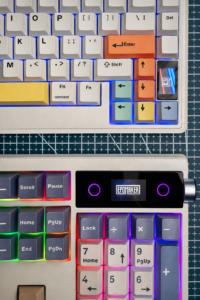 The TH108 Pro uses a horizontal screen, unlike the vertical display on the TH80 V2 Pro. I downloaded the default GIF to figure out the dimensions which is 160×96.
The TH108 screen is more than bright enough for information like time, battery, and animations, although it’s WAY more fun to upload GIFs. To upload GIFs, you need to connect via wired USB (not the dongle). Again, I wish Epomaker had a library of GIFs. I’ll try and make some over the coming days.
If you’re interested in how the screens compare, I’ve attempted to capture them in the photo. Both images show the “default” Epomaker GIF animation.
One thing I can’t figure out and is honestly the only drawback of the Epomaker TH108 is that there are two flashing circles on each side of the screen (purple in this photo). They cannot be turned off, recolored, or configured. I actually thought they might have been touchscreen buttons at one point (seriously, I tapped them in hope!), but alas they’re not.
Epomaker TH108 Pro Screen GIFs
Just to give back to the community, sharing a GIF I made for the Epomaker TH108 Pro Screen. I’ll try and make some more over the coming days.

The Mysterious ‘Super’ Button
I didn’t notice this until I took photos (and I didn’t take a clean photo, so need to fix this later). On the right side of the keyboard, there’s a “Super” button. The user guide skips over what it does… but it’s for macros!
Epomaker TH108 Pro Drivers and Connectivity
The TH108 Pro works on both Mac and Windows. Like other Epomaker keyboards, it supports three connection methods:
- Wired USB‑C, which is for loading GIF updates to the screen
- 2.4 GHz wireless, which is how I use it day to day
- Bluetooth, best as a switch option if you device swap from one PC to the next
Drivers and configuration tools are available at epomaker.driveall.cn. This is my favorite thing about Epomaker, as my work IT department locks down installs. Browser‑based software means I can customize the RGBs (yay!). The web based driver supports remapping, lighting control, and screen customization.
RGB Lighting on the TH108 Pro
Epomaker, as a rule, has great RGB lighting. Bright, full surround on each key and lighting is even. Since I am using a white keyboard, I mainly use the RGBs for backlights vs going full rainbow. The web-based driver lets you customize everything, aside from those circles on the left and right of each screen… ha! do I complain about those circles too much?
Epomaker TH108 Pro Battery Life
Epomaker always go all out on battery capacity. The TH108 Pro is one exception, and it has a massive 10,000mAh battery. Epomaker claims up to 42 hours of use with RGB backlighting and screen on, and up to 200 hours with RGB and screen off. In my real-world use, battery life is strong and I am a week in without needing to recharge. This is with lighting enabled and I would say heavy (daily) office use; including me flashing a few GIFs. I would say that using the screen does not appear to have a major impact on battery life, even if the flashing circles on each side of the screen cannot be disabled.
Final Thoughts and Verdict
The Epomaker TH108 Pro is a well‑built full‑size keyboard with quiet switches, a clean aesthetic, and like all Epomaker products, is really good value. The Sea Salt Silent switches are my go-to for office environments. The side‑mounted volume control is convenient, and the browser‑based software is easy to use. The horizontal screen is cool. The only real drawback is the pair of flashing circles next to the screen that cannot be disabled or controlled. If Epomaker adds a way to turn them off, the TH108 Pro would be close to perfect.
If you want a full‑size keyboard with a screen, quiet switches, and a clean look, the Epomaker TH108 Pro is an excellent choice. If you don’t need the numeric keypad, the TH80 V2 Pro is the ideal backup choice if you still want the fun of a screen.
Hope this helps someone else!
Any and all advice, guides, and reviews are unbiased and based on my personal experience. If you buy through affiliate links, I may earn commissions, which helps support my website. This does not have an impact on posts or my opinion of any reviewed products. If you find this post helpful and want to say thanks, please buy me a coffee or take a look at my book on Amazon. It keeps this page ad-free. Thank you!