
Any and all advice, guides, and reviews are unbiased and based on my personal experience. If you buy through affiliate links, I may earn commissions, which helps support my website. This does not have an impact on posts or my opinion of any reviewed products. If you find this post helpful and want to say thanks, please buy me a coffee or take a look at my book on Amazon. It keeps this page ad-free. Thank you!
I spend a lot of time with compact Eink devices. I own every XTEINK model and follow the steady stream of innovation coming out of China (because Amazon has most definitely lost their way on eInk innovation). If you exclude the Remarkable, most eInk innovation is coming out of China, specifically Shenzhen. I lived in Guangzhou several years ago, but Shenzhen is in the same Guangdong province and passed through Shenzhen whenever I caught the train to Hong Kong. LilyGo is yet another Shenzhen microreader/eInk device that I randomly discovered. They sit closer to and in the general space as the M5 Paper. They are not truly consumer eReaders, but they’re doing some interesting things. Also, to be clear, this is my personal opinion, and I am not affiliated or associated with LilyGo.
This blog post looks at 3 current LilyGo devices:
- T Deck Max
- T5 E Paper S3 Pro Lite
- T Deck Pro Meshtastic
All three show how much experimentation is happening in the microreader/ compact eInk category.
Who and What Is LilyGo?
No, LilyGo is not a Toy Story 5 reference to the LilyPad or an attempt to cash in on the movie (at least I think not). LilyGo is a Shenzhen based hardware company focused on ESP32 and ESP32 S3 devices. Their audience seems to primarily be developers and people who want to build tools, dashboards, or communication devices. This is why I think they’re more like M5 because they also make a lot of other interesting devices. Adding to the developer vibe, LilyGo publish code and limited schematic guides on GitHub. If you come from a developer background, this is the right kind of transparency and something XTEINK fumbled with the locked X4/X3 debacle. LilyGo devices are not eReaders (the physical keyboard on most models is probably the dead giveaway). I’ll say this often in this post, they are closer to the M5 Paper line. If you want a pocketable reading device, XTEINK is still the better option (at least until I get my hands on an EEGO device).
LilyGo Devices Overview
LilyGo has 3 core eInk products, these are:
- T Deck Max
- T5 E Paper S3 Pro Lite
- T Deck Pro Meshtastic
Each model has subvariants. Different memory options. Optional keyboards. Optional radios. Again, it’s all developer forward vs consumer facing – but still interesting. Ordering a LilyGo is almost like ordering a custom PC build because you can also order bare bone boards, customize your radio options and more. The radio customization is because some of these devices are phone-like, so need to operate in the appropriate radio spectrum.
Here’s my observations on each of the main LilyGo devices that would be of interest to XTEINK or EEGO owners.
LilyGo T-Deck Max
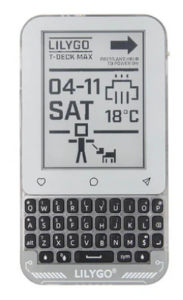 The T-Deck Max seems to be the most complete device in the lineup. A compact handheld with a Blackberry-style keyboard, ESP32 S3 chipset, and a 3.7 inch eInk display. It looks like Blackberry and an XTEINK X3 had a baby. It works well as a terminal, a compact dashboard, or a low power note capture device.
Key Specs
- ESP32 S3 chipset
- 3.7 inch eInk display (same as XTEINK X3)
- Mechanical keyboard
- USB C
- MicroSD
- Rechargeable battery
Price: USD $79 to $99 (spec dependent)
T5 E Paper S3 Pro Lite
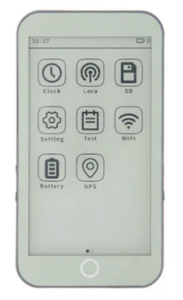 The T5 E Paper S3 Pro Lite is the closest thing LilyGo has to a microreader. It appears to have wireless charging, there’s a version that supports GPS (why, I don’t know) but overall, it is MUCH chunkier than XTEINK devices and kinda looks like an eInk iPhone 4. It has a backlight/frontlight (yay!) and would probably make an OK TRMNL device.
Price: USD 55 to 69
Key Specs
- ESP32 S3 chipset
- 4.7 inch eInk display (bigger than XTEINK X4)
- GPS Support (Why? I dunno)
- USB C
- Open firmware support
T Deck Pro Meshtastic
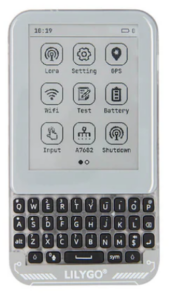 The T Deck Pro Meshtastic has voice support, so it’s seems best suited to communications. It includes LoRa radios and is designed for Meshtastic users. If you know what Meshtastic is, this is the LilyGo device for you. For most of us though, this is not the device you’re looking for (waving my hands in mysterious Jedi like manner). If you don’t know what Meshtasic, it’s a decentralized off-grid mesh networking communication standard. Before you get excited, this has a tiny screen at 3.1” (smaller than the X3) so it’s definitely not ideal as microreader/eInk reader.
Price: USD $89 to $119 (again, spec dependent)
Key Specs
- ESP32 chipset
- 3.1” eInk display (smaller than XTEINK X3).
- LoRa radio
- USB C
- Rechargeable battery
- Meshtastic firmware support
Comparison Table of LilyGo Devices
Here’s a quick comparison of the main (default) configurations) of LilyGo devices.
| Feature | T Deck Max | T5 E Paper S3 Pro Lite | T Deck Pro Meshtastic |
|---|---|---|---|
| Chipset | ESP32-S3 Dual-core LX7 | ESP32-S3-WROOM-1 | ESP32-53FN16R8 Dual-core LX7 |
| Display | 3.7" | 4.7" | 3.1" |
| Resolution | 320 x 240 | 540 x 960 | 320x240 |
| RAM | 16Mb | 16Mb | 16Mb |
| PSRAM | 8Mb | 8Mb | 8Mb |
| Touch | No | Yes | No |
| Radios | 4G + GPS | 2.4Ghz + WiFi + BLE | 2.4Ghz + WiFi + BLE |
| Keyboard | Yes | No | Yes |
| Battery | Unknown | Optional | 1400mAh |
| Storage | MicroSD | MicroSD | MicroSD |
| USB | USB C | USB C | USB C |
| Typical Use | Terminal or handheld tool | Dashboard, Display, eReader | Meshtastic communication |
| Price | USD $79 to $99 | USD $55 to $69 | USD $89 to $119 |
LilyGo and Crosspoint Support
LilyGo actively supports Crosspoint. That’s actually how I found LilyGo, as they were showing a demo of Crosspoint on the T-Deck Max. It’s pretty cool to see Crosspoint adoption is increasing, and Chinese hardware makers leaning into it. BTW, if you missed it, XTEINK now has an official Crosspoint partnership. LilyGo is not an official Crosspoint partner as far as I know, heck the Crosspoint devs. may not even aware of the device. I’m not 100% sure if it’s stock Crosspoint or a fork, given the LilyGo T-Deck Max has a keyboard instead of the XTEINK buttons (making navigation less than intuitive).
How LilyGo Compares to XTEINK and EEGO
EEGO devices haven’t shipped yet, so I can’t really say. But I do own XTEINK devices. XTEINK is a much more consumer friendly microreader. LilyGo devices are developer tools, as I said before, more like the M5 Paper. So, I wouldn’t ditch your XTEINK just yet.
Final Thoughts
I do not own any LilyGo devices. Will I buy one? Possibly. I already have preordered the XTEINK S3 and the EEGO devices, so I’m kind of at capacity of eInk devices (alongside my X4 and X3). I’m definitely intrigued by the LilyGo, especially the T-Deck Max. If you think I should get one and share my thoughts, feel free to buy me a coffee. If enough people do, I promise to buy one and share more insights.
Hope this helps someone else!
FYI, the XTEINK X4 is now available direct on Amazon.com and the X3 is now available on Amazon too!
Please feel free to link back to this page or any of my other XTEINK posts.
Some of my other posts about XTEINK devices:
XTEINK X4
- Buy the XTEINK X4 from Amazon
- The best tools, hacks, and more for XTEINK X4 owners
- Ultimate XTEINK X4 FAQ (Unofficial)
- XTEINK X4 troubleshooting, fix common problems and issues.
- How to change the XTEINK language from Chinese to English
XTEINK X4 V2 Pro
XTEINK X3
XTEINK S4
XTEINK Wallpaper eInk Card
XTEINK YouTube Videos
XTEINK vs EEGOGO Memory Dispute
Any and all advice, guides, and reviews are unbiased and based on my personal experience. If you buy through affiliate links, I may earn commissions, which helps support my website. This does not have an impact on posts or my opinion of any reviewed products. If you find this post helpful and want to say thanks, please buy me a coffee or take a look at my book on Amazon. It keeps this page ad-free. Thank you!